Using Envoy with SPIRE
How to configure the Envoy proxy with SPIFFE and SPIRE
Envoy is a popular open-source service proxy that is widely used to provide abstracted, secure, authenticated and encrypted communication between services. Envoy enjoys a rich configuration system that allows for flexible third-party interaction.
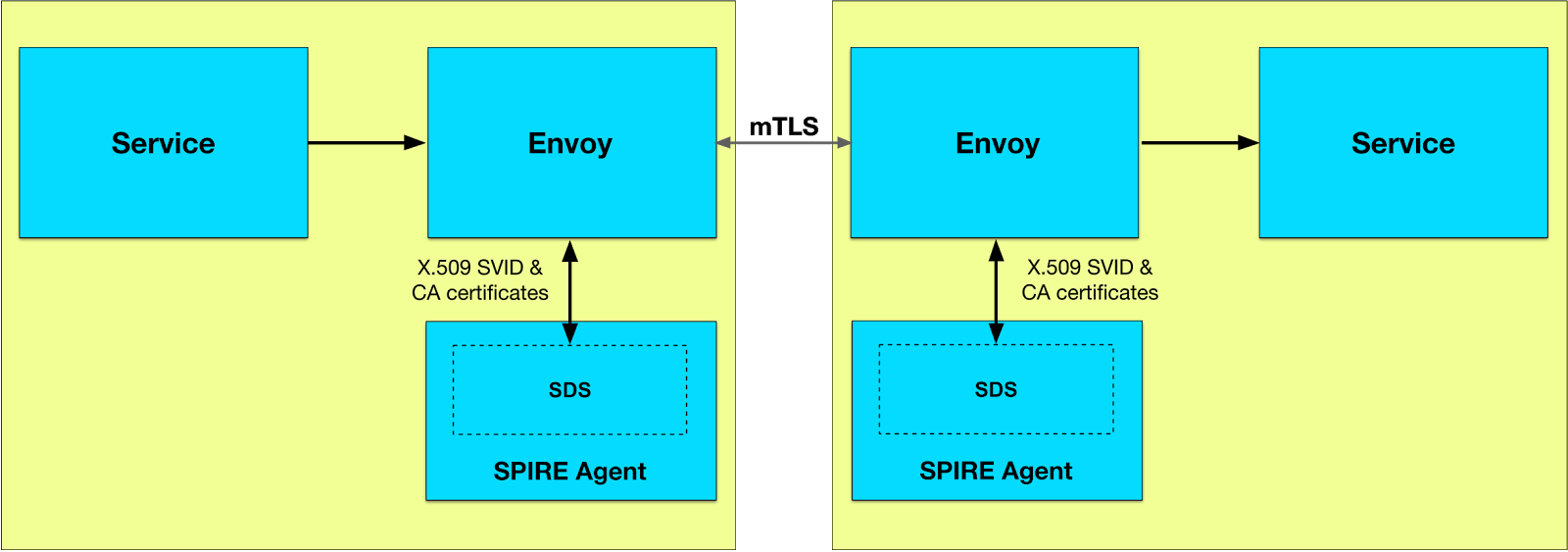
One component of this configuration system is the Secret Discovery Service protocol or SDS. Envoy uses SDS to retrieve and maintain updated “secrets” from SDS providers. In the context of TLS authentication, these secrets are the TLS certificates, private keys, and trusted CA certificates. The SPIRE Agent can be configured as an SDS provider for Envoy, allowing it to directly provide Envoy with the key material it needs to provide TLS authentication. The SPIRE Agent will also take care of re-generating the short-lived keys and certificates as required.
For Kubernetes-based examples of how to integrate SPIRE with Envoy, see Integrating with Envoy using X.509 certs and Integrating with Envoy using JWT.
How It Works
When Envoy connects to the SDS server exposed by the SPIRE Agent, the Agent attests Envoy and determines which service identities and CA certificates it should make available to Envoy over SDS.
As service identities and CA certificates are rotated, updates are streamed back to Envoy, which can immediately apply them to new connections without interruption or downtime and without the private keys ever having to touch the disk. In other words, SPIRE’s rich methods of defining and attesting services can be used to target the Envoy process, define an identity for it, and provide it with X.509 certificates and trust information that Envoy can use for TLS communication.
Configuring SPIRE
As of SPIRE version v0.10, SDS support is enabled in SPIRE by default, so no SPIRE configuration change is needed. In earlier versions of SPIRE, enable_sds = true was required in the SPIRE Agent configuration file. That setting is now deprecated and should be removed from SPIRE Agent configuration files for SPIRE versions v0.10 and later.
Configuring Envoy
The following examples use the Envoy v3 API, which is required by Envoy 1.17 and later.
SPIRE Agent Cluster
Envoy must be configured to communicate with the SPIRE Agent by configuring a cluster that points to the Unix domain socket the SPIRE Agent provides.
For example:
clusters:
  - name: spire_agent
    connect_timeout: 0.25s
    http2_protocol_options: {}
    load_assignment:
      cluster_name: spire_agent
      endpoints:
        - lb_endpoints:
            - endpoint:
                address:
                  pipe:
                    path: /tmp/spire-agent/public/api.sock
The connect_timeout influences how fast Envoy will be able to respond if the SPIRE Agent is not running when Envoy is started or if the SPIRE Agent is restarted.
TLS Certificates
To obtain a TLS certificate and private key from SPIRE, you can set up an SDS configuration within the TLS context of a transport_socket. The TLS context is configured via the typed_config of the transport socket, using a DownstreamTlsContext on listeners or an UpstreamTlsContext on clusters.
For example, on a listener:
transport_socket:
  name: envoy.transport_sockets.tls
  typed_config:
    "@type": type.googleapis.com/envoy.extensions.transport_sockets.tls.v3.DownstreamTlsContext
    common_tls_context:
      tls_certificate_sds_secret_configs:
        - name: "spiffe://example.org/backend"
          sds_config:
            resource_api_version: V3
            api_config_source:
              api_type: GRPC
              transport_api_version: V3
              grpc_services:
                envoy_grpc:
                  cluster_name: spire_agent
The name of the TLS certificate is the SPIFFE ID of the service that Envoy is acting as a proxy for.
Validation Context
Envoy uses trusted CA certificates to verify peer certificates. Validation contexts provide these trusted CA certificates. SPIRE can provide a validation context per trust domain.
To obtain a validation context for a trust domain, you can configure a validation context within the SDS configuration of the TLS context in a transport_socket, setting the name of the validation context to the SPIFFE ID of the trust domain. Using a combined_validation_context, SPIRE supplies the trusted CA certificates via SDS while the static default_validation_context can restrict which peer SPIFFE IDs are accepted via match_typed_subject_alt_names.
For example, on a listener:
transport_socket:
  name: envoy.transport_sockets.tls
  typed_config:
    "@type": type.googleapis.com/envoy.extensions.transport_sockets.tls.v3.DownstreamTlsContext
    common_tls_context:
      combined_validation_context:
        # validate the SPIFFE ID of incoming clients (optionally)
        default_validation_context:
          match_typed_subject_alt_names:
            - san_type: URI
              matcher:
                exact: "spiffe://example.org/frontend"
        # obtain the trust bundle from SDS
        validation_context_sds_secret_config:
          name: "spiffe://example.org"
          sds_config:
            resource_api_version: V3
            api_config_source:
              api_type: GRPC
              transport_api_version: V3
              grpc_services:
                envoy_grpc:
                  cluster_name: spire_agent
SPIFFE and SPIRE are focused on facilitating secure authentication as a building block for authorization, not authorization itself. Beyond matching the peer SPIFFE ID as shown above, we recommend you leverage Envoy’s extensive filter framework for performing authorization.
Additionally, you can configure Envoy to forward client certificate details to the destination service, allowing it to perform its own authorization steps, for example by using the SPIFFE ID embedded in the URI SAN of the client X.509-SVID.
